Custom Elementor widgets or more plugins?
When to install another plugin and when to build your own Elementor widget, and what each choice costs your page speed.
When a WordPress page needs something new, such as a pricing table, a filterable grid or a custom slider, there are two usual answers: install another plugin, or build the piece yourself. Neither is always right. This is how I decide.
Plugins are not slow by default
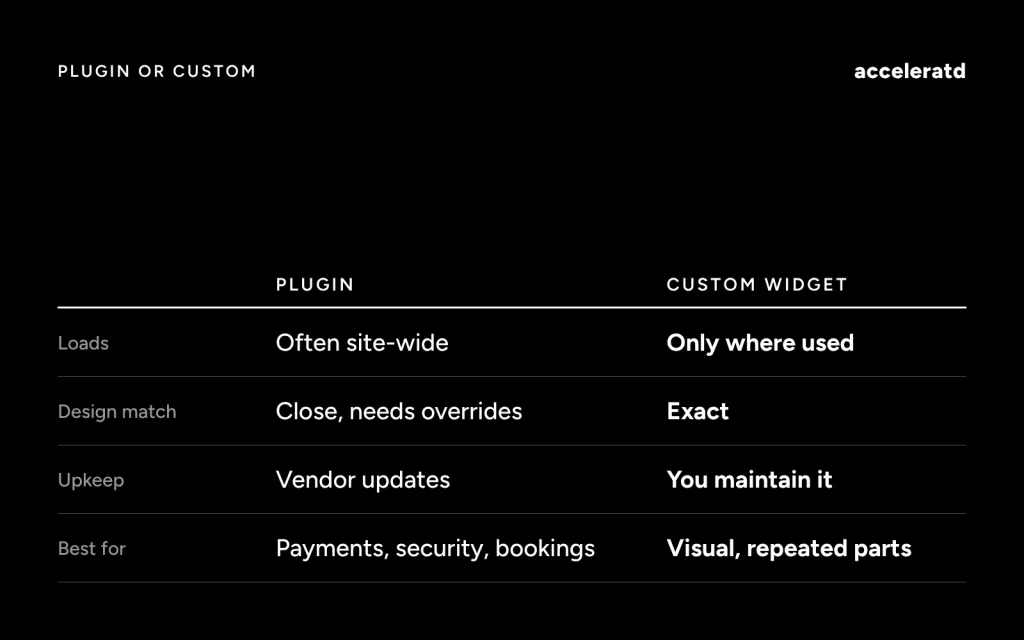
A well-built plugin does one job and loads only where it is needed. The trouble starts when a plugin brings far more than you use: dozens of features, its own framework, and assets that load on every page. You pay for all of it, whether you use it or not.
What each extra plugin can cost
- More stylesheet and script requests on every page.
- Extra database queries and options loaded on each request.
- Another thing to update, test and keep compatible.
- Design that is close to yours but never quite matches, so overrides pile up.
When a custom widget wins
Building your own Elementor widget makes sense when the design is specific to the site, when the same component appears on many pages, and when you want full control of the markup. A custom widget can register its CSS and JavaScript as dependencies of that widget only, so a page that does not use it never loads them. The markup stays small and matches the design system exactly.
When a plugin wins
Use a plugin when the job is complicated and well solved elsewhere: payments, bookings, security, forms with serious spam protection, backups. Do not rebuild those. Pick one that is actively maintained, check what it loads on the front end, and avoid the ones that bundle ten features when you need one.
A simple way to decide
- Is the feature core to the business or only visual? Visual pieces suit custom code.
- Is it hard to get right, such as money, security or legal? Use a plugin.
- Will the plugin load assets on pages that do not use it? If yes, check whether you can limit that.
- Can you maintain your own code? A custom widget is only a good idea if someone will look after it.
Measure before you decide
Query Monitor and your browser’s network panel show what each plugin adds. Remove or replace the ones that cost the most and give the least. For the Shopify version of this problem, see why your Shopify store is slow, and for the metrics to track, the Core Web Vitals checklist.